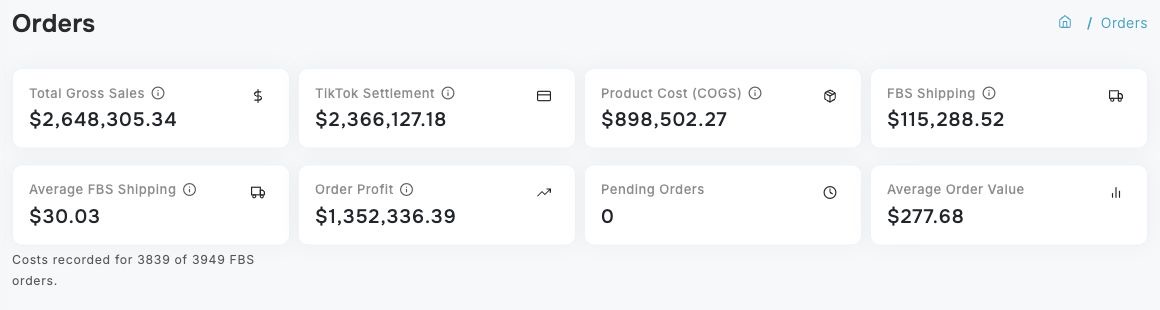
The Orders page gives you a detailed, searchable list of every order placed in your TikTok Shop. You can search by order ID or customer name, filter by date, status, payment method, and amount, view geographic distribution on a map, and export your order data to CSV. Clicking any order opens a detail modal with the full breakdown.
Money is displayed in your shop's currency. JPY and other zero-decimal currencies do not show a trailing decimal suffix, while currencies with minor units keep their normal decimal places. This changes presentation only; the underlying order values are unchanged.
If your Flex Charge Limit has been reached, imports continue and existing visible data stays available. New post-cap orders are saved but hidden from views, reports, and exports. The Orders page continues to show records that were visible before the limit was reached. Raise your Flex Charge Limit in Settings > Subscription or upgrade your plan to release hidden orders. You can also contact support. A temporary support exception may keep records visible while a reviewed custom arrangement is pending.
Metric cards at the top provide a quick snapshot of order activity for the selected date range. Cards adjust to your screen width so large amounts, including cents, stay together on one line.
For high-volume shops, Dashboardly can show the most recent complete summary immediately while it refreshes the exact totals in the background. The order table continues to show the latest synced orders during that refresh, so the cards may briefly lag behind the table. Changing the date range or filters automatically loads the matching summary; Dashboardly never combines partial results from different filters.
The cards use the same selected date range and filters as the order table:
| Card | What it shows |
|---|---|
| Total Gross Sales | Product value before seller-funded and TikTok-funded discounts or refunds. |
| TikTok Settlement | The sum of available order-level settlement amounts from TikTok for the selected orders. TikTok has already included its platform fees and TikTok shipping in this amount. The card's information tip shows how many orders are final, provisional, or still awaiting settlement. |
| Product Cost (COGS) | Product cost directly assigned to the selected orders, including confirmed order-level restock credits where applicable. |
| FBS Shipping | Your own FBS shipping cost directly assigned to eligible orders. This does not subtract TikTok shipping a second time. |
| Average FBS Shipping | Total FBS Shipping divided by eligible FBS orders with a recorded or configured shipping cost. The coverage below the card shows how many orders have costs. |
| Order Profit | The combined profit from the selected order rows. For a settled order, this is TikTok Settlement − COGS − FBS Shipping. For a paid order still awaiting settlement, Dashboardly uses the same clearly marked estimate shown in that order row. An unpaid order without a settlement contributes no sale profit. |
| Pending Orders | Orders currently awaiting shipment, awaiting collection, or on hold. |
| Average Order Value | Customer Paid divided by the number of paid orders in the selected range. |
Average FBS Shipping includes non-cancelled seller-fulfilled orders using seller-arranged shipping. Unpaid quotes without a TikTok settlement are excluded. The cost follows the same priority as the order's FBS Shipping value: an order-linked cost, an applicable per-order rule, then your applicable per-unit Inventory rate. Sample orders use only per-order rules that cover samples. The average therefore includes configured costs as well as imported label costs; it is an average actual label cost only when those recorded costs are actual labels.
An explicitly recorded $0 cost is included. An unconfigured Inventory default of zero is missing cost and is excluded. For example, two $10 costs, one recorded $0 cost and seven missing costs give $6.67 Average FBS Shipping with Costs recorded for 3 of 10 FBS orders. The denominator counts orders, not units, and the calculation uses the whole selected range and filters, regardless of pagination. Across days, Dashboardly divides the combined cost by the combined count; it does not average daily averages.
If no eligible order has a recorded cost, the card shows —. Older daily summaries can keep the other financial cards visible while coverage refreshes; during that transition the average shows — and Cost coverage is updating.
An order with zero Customer Paid can still have product costs or directly assigned shipping costs. These costs remain in the row and the summary, including for samples and free orders. Zero payment is not the same as an unpaid quote or a cancelled order. Such orders do not increase the paid-order denominator used for Average Order Value.
Order Profit is intentionally different from P&L Net Profit. The Orders page includes only values that Dashboardly can attribute to specific orders. Shop-level ad spend, account-level affiliate costs, manual income or expenses, and statement adjustments that do not identify an order remain on the Dashboard and Profit & Loss pages. Dashboardly does not spread those amounts across orders because doing so would create an artificial per-order result.
For example, suppose TikTok Settlement is $100, the product cost is $25, and your FBS shipping is $5. The Orders page shows $70 Order Profit. If the shop also has $12 of advertising spend that TikTok does not identify by order, the full P&L Net Profit can be $58. Both numbers are correct for their purpose: $70 answers "what did these orders earn after their direct costs?", while $58 answers "what did the shop earn after all included shop-level costs?"