
Analyze Linux disk image artifacts, including logs and Bash history, using FTK Imager to investigate insider threat activities and reconstruct user actions.
After Karen started working for 'TAAUSAI,' she began doing illegal activities inside the company. 'TAAUSAI' hired you as a soc analyst to kick off an investigation on this case.
You acquired a disk image and found that Karen uses Linux OS on her machine. Analyze the disk image of Karen's computer and answer the provided questions.
To determine the Linux distribution being used on this machine, we begin by examining the file system captured in the disk image using FTK Imager. After loading the disk image, we navigate through the directory structure to locate logs or configuration files that can reveal system information. A good starting point is the /var/log/ directory, which often contains logs related to system activities and installation details.
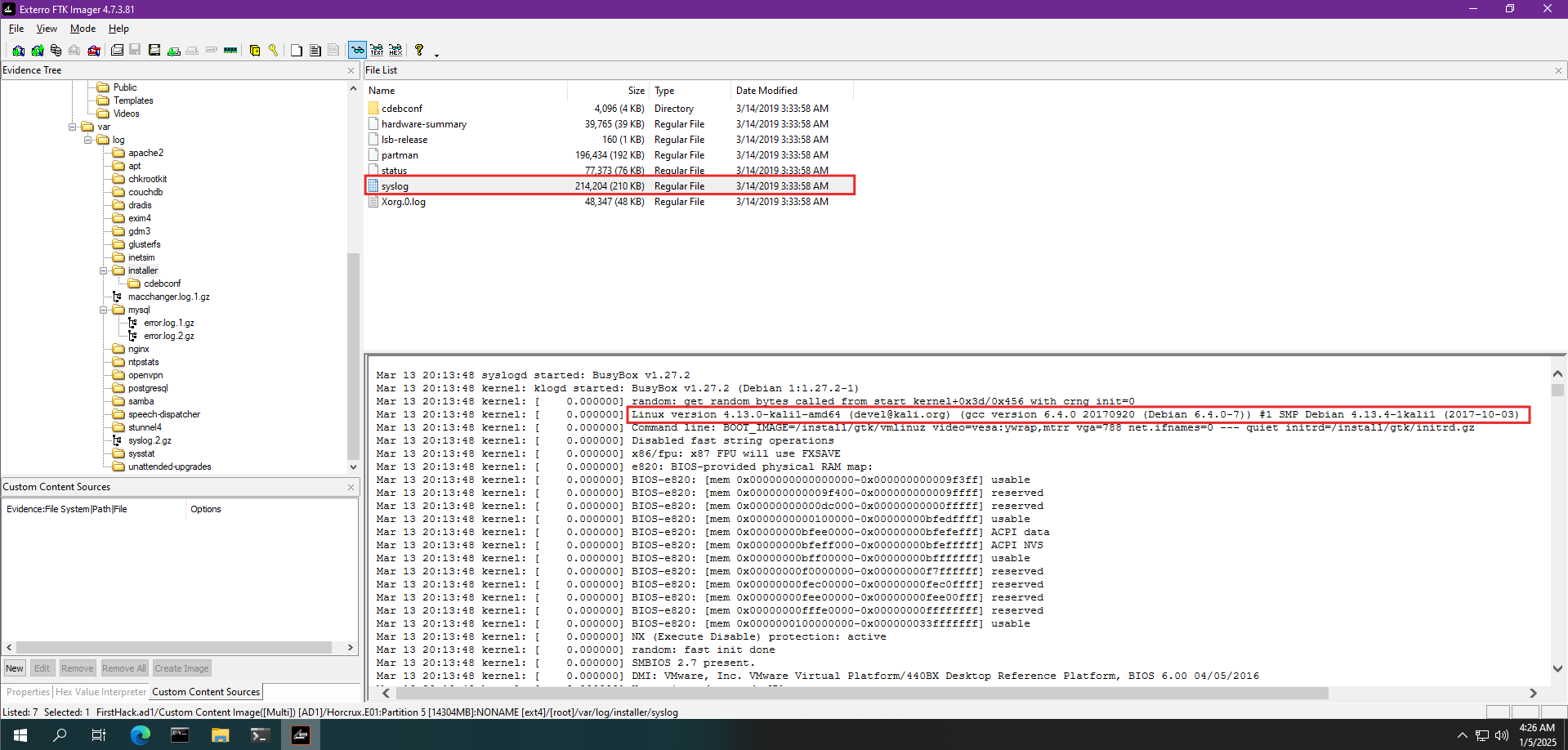
In this case, we focus on the syslog file found in the /var/log/installer/ directory. Opening this file reveals detailed logs, including kernel initialization messages and boot parameters. Logs of this nature frequently provide information about the operating system version and distribution, as the kernel version and build metadata are logged during system startup.
Within the syslog, we find a line indicating the Linux kernel version being used:
Linux version 4.13.0-kali1-amd64 ([email protected]) (gcc version 6.4.0 20170920 (Debian 6.4.0-7)) #1 SMP Debian 4.13.4-1kali1 (2017-10-03)
Analyzing this output, we identify that the operating system is Kali Linux, which is a Debian-based distribution designed for security testing and penetration testing purposes. The kernel version is 4.13.0-kali1-amd64, compiled using GCC version 6.4.0. The reference to kali.org confirms the distribution as Kali Linux.
Kali Linux is a specialized distribution widely used by security professionals due to its extensive set of pre-installed tools for penetration testing, digital forensics, and security auditing. Its presence in this investigation hints at the possibility that the user may have utilized such tools to conduct unauthorized activities. Given this context, the operating system itself becomes a critical piece of evidence, potentially providing further leads as we continue analyzing logs and installed utilities.
To determine the MD5 hash of the Apache access.log file, we first need to understand the concept of hashing. Hashing is a cryptographic process used to generate a fixed-length string, called a hash value, from input data of any size. This process is deterministic, meaning the same input will always produce the same hash. Hashing is commonly used to verify the integrity of files, ensuring that no changes have been made to the data. In digital forensics, hash values are critical for verifying the authenticity of evidence and identifying tampered or altered files.
The Apache access.log file is an essential component of the Apache HTTP Server, which records all HTTP requests made to the server. It logs details such as the IP address of the client, timestamps, requested URLs, HTTP methods, response codes, and user-agent information. This log is vital for monitoring server activity, detecting malicious requests, and identifying potential security incidents. In forensic investigations, examining this log can reveal unauthorized access attempts or patterns indicating malicious behavior.
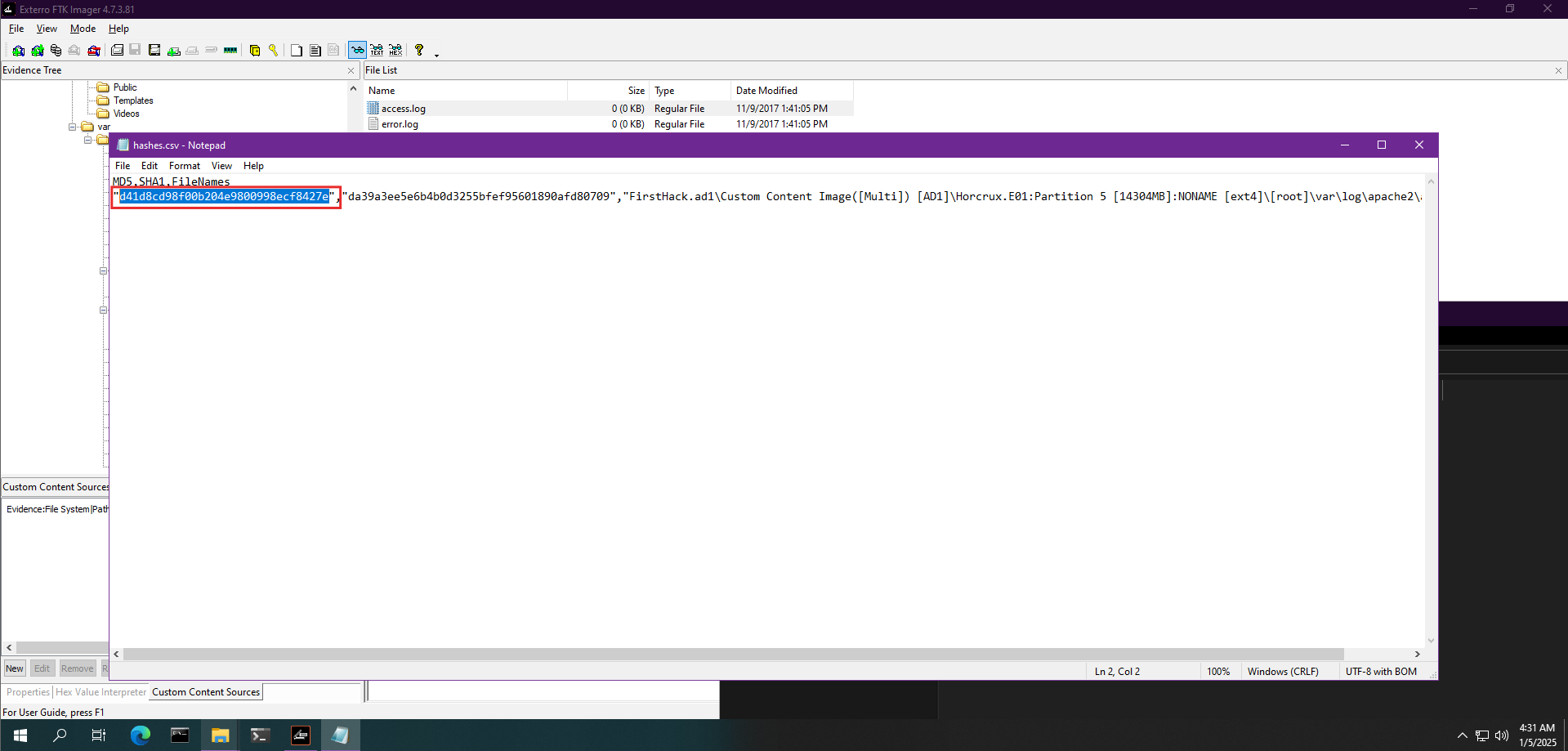
Using FTK Imager, we can calculate the MD5 hash of files located in the disk image. The screenshot above shows the output of a hash report, which includes the MD5 hash for the access.log file. The highlighted section in the hash report displays the MD5 hash value as d41d8cd98f00b204e9800998ecf8427e.