Analyze a forensic image to extract communication artifacts, identify malware behavior, and decrypt encrypted files using FTK Imager, string analysis, and PowerShell scripting.
The IMF is hit by a cyber attack compromising sensitive data. Luther sends Ethan to retrieve crucial information from a compromised server. Despite warnings, Ethan downloads the intel, which later becomes unreadable. To recover it, he creates a forensic image and asks Benji for help in decoding the files.
Resources:
In this engaging scenario, the Impossible Missions Force (IMF) has fallen victim to a sophisticated cyber attack that has compromised sensitive intelligence data. Luther sends field agent Ethan Hunt to retrieve crucial information from a compromised server. Despite receiving warnings about potential security risks, Ethan proceeds to download the critical intel. However, when the team attempts to access the retrieved files later, they discover that the data has become unreadable, potentially encrypted or corrupted by the attackers.
To recover this mission-critical intelligence, Ethan creates a forensic image of the compromised system and enlists the help of technical expert Benji Dunn to decode and recover the encrypted files. This is where your expertise as a digital forensics investigator becomes essential to the mission's success. Throughout this investigation, you will utilize industry-standard forensic tools and techniques that mirror real-world digital forensics practices. The lab emphasizes hands-on experience with FTK Imager for disk image analysis, SQLite database examination for browser forensics, string analysis for malware reverse engineering, and various other forensic methodologies that are crucial for any SOC analyst or DFIR professional.
This forensic challenge will test your ability to analyze compromised systems, trace attack vectors, recover encrypted data, and piece together the complete timeline of a security incident. You'll navigate through various aspects of endpoint forensics including file system analysis, browser artifact examination, email forensics, malware analysis, and data recovery techniques. The investigation requires a methodical approach, combining technical skills with analytical thinking to uncover the truth behind this cyber breach and ultimately recover the sensitive intelligence that could have global implications if it falls into the wrong hands. Let's get started!
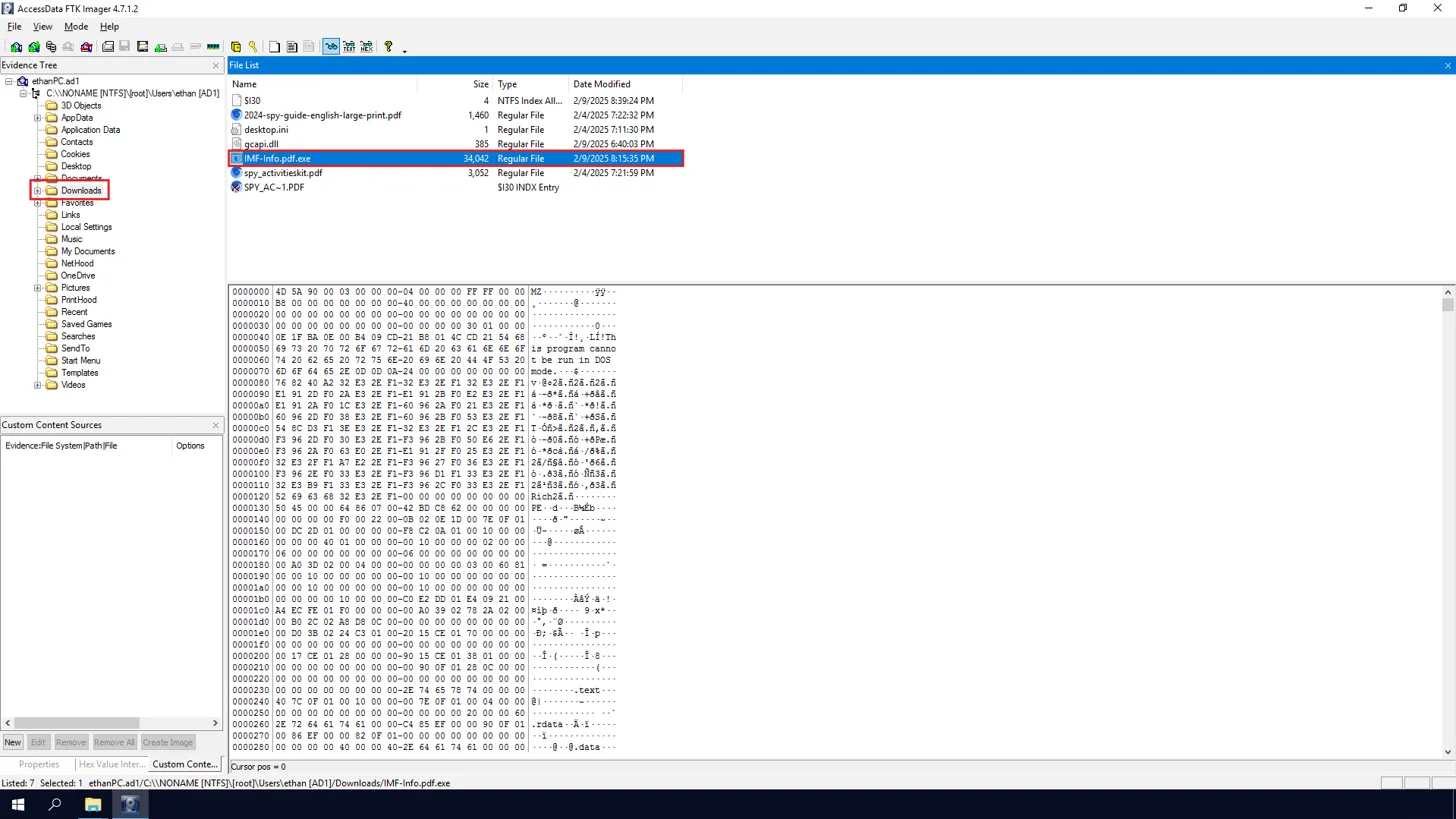
To begin our investigation of this compromised system, we need to examine the forensic disk image using FTK Imager. FTK Imager allows us to create bit-for-bit copies of storage devices and examine file systems without altering the original evidence, making it essential for maintaining forensic integrity during digital investigations. When we open the disk image in FTK Imager, we can navigate through the file system hierarchy displayed in the Evidence Tree pane on the left side of the interface. This tree structure shows the logical organization of the file system, allowing us to explore different directories and their contents systematically. For this investigation, we focus our attention on the Downloads folder, which is typically located within a user's profile directory. The Downloads folder is important in forensic investigations because it represents one of the most common locations where users save files from the internet, including potentially malicious executables that may have been delivered through phishing campaigns, drive-by downloads, or social engineering attacks.
Upon examining the Downloads folder, we can see several files that warrant investigation. Among these files, we notice an executable file with a suspicious filename, using double extensions, that stands out from typical user downloads.
The presence of executable files in the Downloads folder should always be treated with caution during forensic analysis, as attackers frequently use this location to stage their malicious payloads before execution. We can extract the file hashes using FTK Imager.
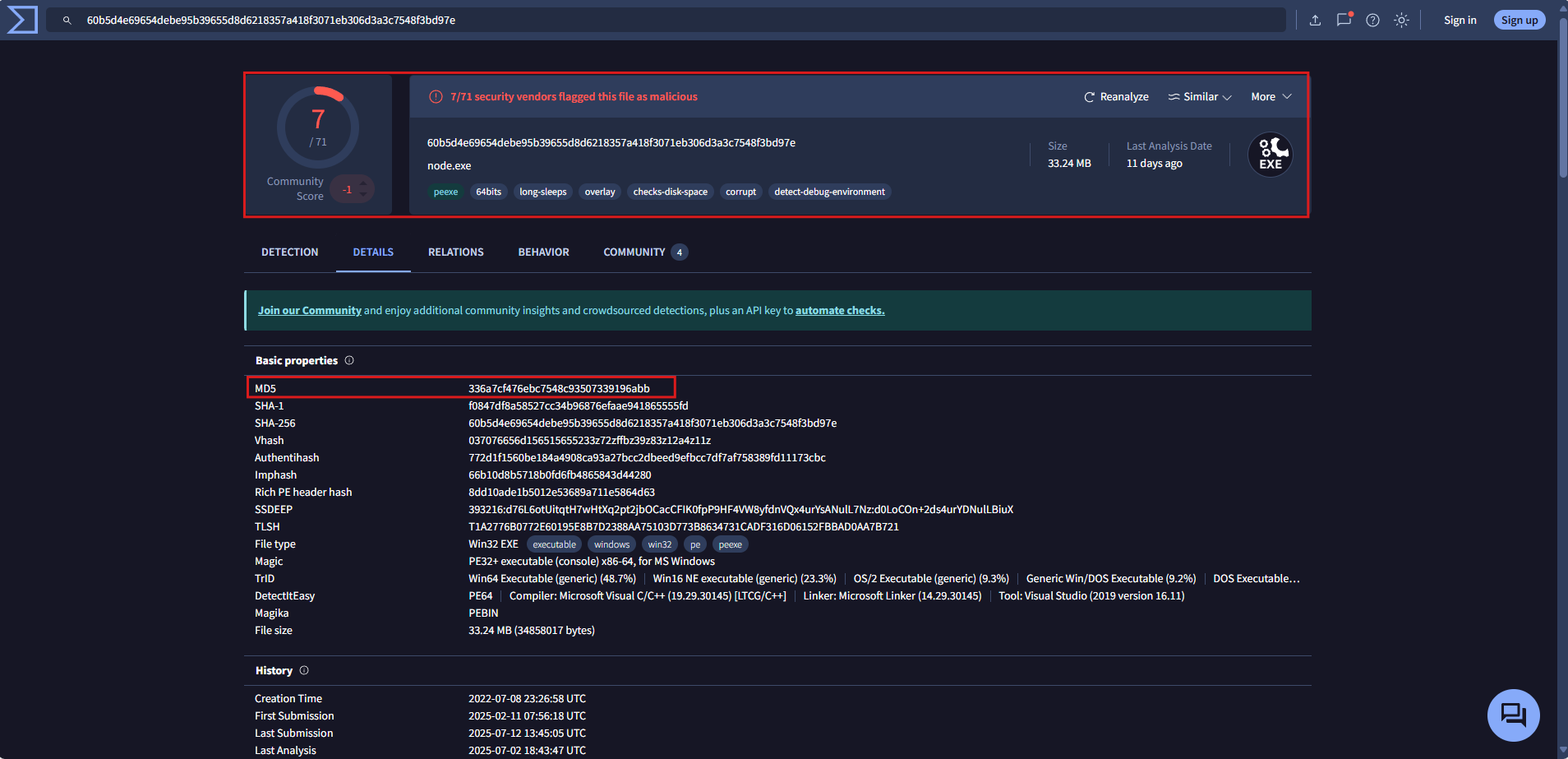
Once we obtain the hashes of the executable file, we can leverage threat intelligence platforms like VirusTotal to gather additional context about the file's malicious nature. VirusTotal is a free online service that analyzes files and URLs for malicious content using multiple antivirus engines and threat detection tools. By submitting the MD5 hash to VirusTotal, we can determine whether this file has been previously identified as malicious by the security community. The analysis reveals that multiple security vendors have flagged this file as malicious, confirming our suspicions about its nature.
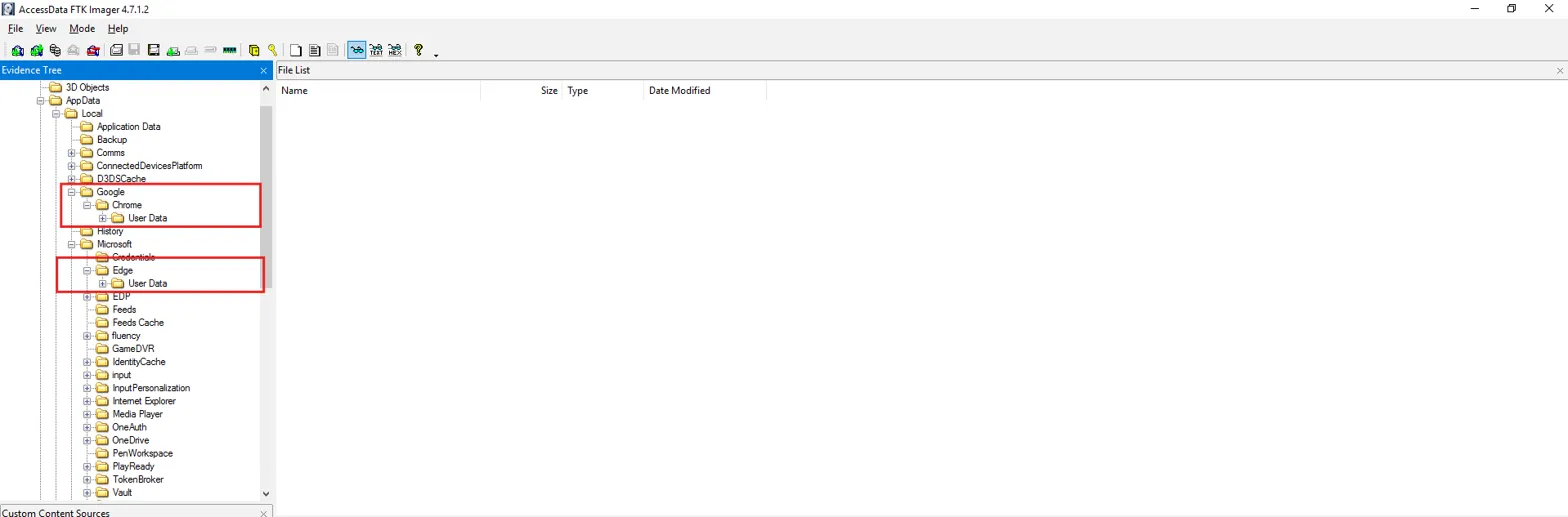
Digital forensics often requires understanding user behavior patterns, and web browsers serve as rich sources of evidence that can reveal how malware was delivered to a compromised system. Modern web browsers store extensive metadata about user activities, including visited websites, download history, and cached content, all of which can provide crucial insights into the attack vector used by threat actors. When we examine the application data folders within the user profile, we can observe that the user had multiple web browsers installed on the system, specifically Google Chrome and Microsoft Edge.